
Keyboard shortcuts
All keys at a glance, taken straight from the program so the list is always right.
Bu bölüm henüz Türkçeye çevrilmedi. Aşağıda İngilizce metin var.
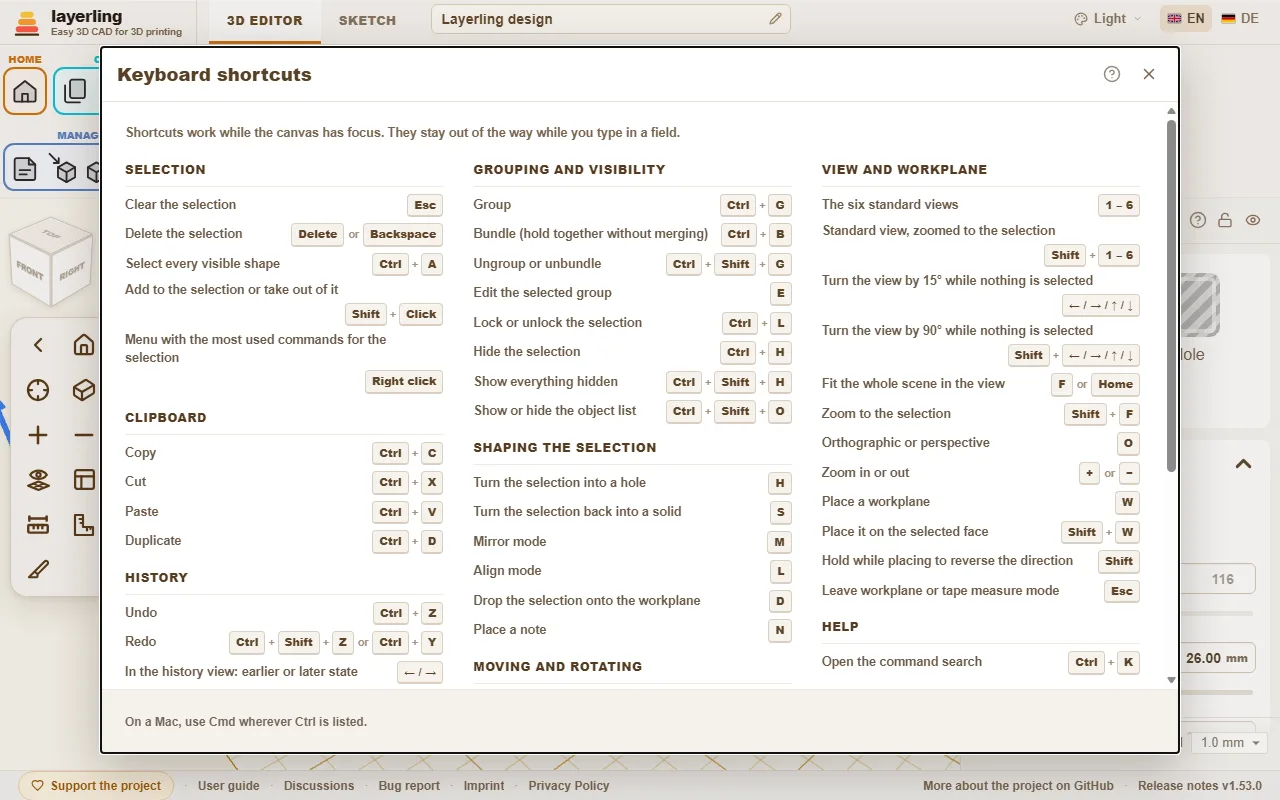
The shortcuts work as long as the workplane has the focus. While you type in a field they keep out of the way. On the Mac, Cmd applies wherever Ctrl is listed here.
In the editor, “Klavye kısayolları” in the “Yardım” area opens the same list as a window. The printer button in the window (“Listeyi yazdır veya PDF olarak kaydet”) prints the list on its own, black on white and in large type; the print dialog of the browser also offers to save it as a PDF.
Command search
Can't find a tool? Press Ctrl+K or click the magnifying glass in the “Yardım” area, then type what you are looking for: a tool ("fillet", "mirror"), a shape ("cylinder") or a command ("export", "undo"). Move with the arrow keys and press Enter, or click the entry.
- The search understands the English and the German word alike and ignores capital letters and umlauts: "aushoehlen" finds “İçini boşalt”.
- Every entry shows the keys that do the same and the area of the toolbar it lives in, so you learn where it is.
- Entries that are greyed out cannot run right now, mostly because nothing is selected. They stay in the list so the search still tells you where the tool is.
The guide you are reading has a search box too, at the top of every page: type a word or two and it lists the sections that contain all of them, with the matching words marked. Click one, or press Enter for the first, to jump straight there.
- A shape's name adds that shape to the workplane, just like clicking it in the shapes menu.
- With an empty field the search lists the commands you used last at the top.
- The name of a body in your design finds that body and selects it, which helps in a design with many parts. Bodies only appear once you type.
- It works in sketch mode as well, with the sketch tools.
Interactive Help
Cannot find where to read about a button or a field? Let the program take you there. Click the question mark in the “Yardım” area, or press Shift+F1. The pointer turns into a question mark, and whatever lies under it is outlined.
- Click a button, a field, a switch, a handle, a group of the ribbon or the title bar of a window. It does not do what it normally does. A small window opens instead, with the name of the element, a short summary of the part of this guide that is about it, up to two more places that mention it, and “Kılavuzda aç”.
- The help is about the element you pointed at, not about the whole window around it. An element without a name of its own uses the nearest one around it; inside a window it falls back on that window's question mark.
- “Kılavuzda aç” opens the guide at that section in a new tab. There the section is outlined in colour, from its heading to its end, so you see where it starts and stops.
- If the guide says nothing about the element, the window says so and offers “Kılavuzda ara”.
- Esc, or the question mark again, leaves the mode. On a touch screen there is no hover: a tap on an element opens the window straight away.
The window moves by its title bar like the other windows. The program finds the section by the name of the element - the label on a button, the name of a field - because this guide writes every button as it is called in the program. It looks it up in the same search as the box at the top of each guide page, in the language you are using, and runs entirely in your browser.
Seçim
| Esc | Seçimi temizle |
| Delete veya Backspace | Seçimi sil |
| Ctrl+A | Görünür her şekli seç |
| Shift+Tık | Seçime ekle veya seçimden çıkar |
| Sağ tık | Seçim için en çok kullanılan komutların menüsü |
Pano
| Ctrl+C | Kopyala |
| Ctrl+X | Kes |
| Ctrl+V | Yapıştır |
| Ctrl+D | Çoğalt |
Geçmiş
| Ctrl+Z | Geri al |
| Ctrl+Shift+Z veya Ctrl+Y | Yinele |
| ← / → | Geçmiş görünümünde: önceki veya sonraki durum |
| Esc | Geçmiş görünümünde: güncel duruma dön |
Dosya
| Ctrl+I | İçe aktarma penceresini aç veya kapat |
| Ctrl+E | Dışa aktarma penceresini aç veya kapat |
| Ctrl+S | Tasarımı dosyasına kaydet |
Gruplama ve görünürlük
| Ctrl+G | Grupla |
| Ctrl+B | Paketle (birleştirmeden bir arada tut) |
| Ctrl+Shift+G | Grubu veya paketi çöz |
| E | Seçili grubu düzenle |
| Ctrl+L | Seçimi kilitle veya kilidini aç |
| Ctrl+H | Seçimi gizle |
| Ctrl+Shift+H | Gizlenen her şeyi göster |
| Ctrl+Shift+O | Nesne listesini göster veya gizle |
Seçime şekil verme
| H | Seçimi deliğe çevir |
| S | Seçimi yeniden katıya çevir |
| T | Seçimi saydam yap veya yeniden opak yap |
| Shift+M | Seçili grup için çok renkli: her parça kendi renginde veya hepsi tek renk |
| M | Aynalama modu |
| B | Seçili gövde için yuvarlatma aracı (tekrar: kapat) |
| Shift+B | Seçili gövde için pah aracı (tekrar: kapat) |
| L | Hizalama modu |
| D | Seçimi çalışma düzlemine indir |
| C | Seçimi kaldır ve bir yüzeye koy (Tinkercad'deki Cruise gibi) |
| N | Not yerleştir |
Taşıma ve döndürme
| ← / → / ↑ / ↓ | Görünüm nasıl döndürülmüşse ona göre bir ızgara adımı taşı |
| Shift+← / → / ↑ / ↓ | Beş ızgara adımı taşı |
| Ctrl+↑ / ↓ | Seçimi yükselt veya alçalt |
| R | 45° döndür |
| Shift+R | 22,5° döndür |
| Shift | Sürüklerken basılı tut: sadece X veya Y boyunca taşı |
| Alt+Sürükle | Bir kopya sürükle, orijinal yerinde kalır |
| Alt | Sürüklerken bir kez bas: diğer şekillere yapışmayı durdur |
| Alt+Enter | Şeklin yanında boyut yazarken: karşı kenardan değil ortadan büyüt |
Görünüm ve çalışma düzlemi
| 1 – 6 | Altı standart görünüm |
| Shift+1 – 6 | Seçime yakınlaştırılmış standart görünüm |
| ← / → / ↑ / ↓ | Hiçbir şey seçili değilken görünümü 15° döndür |
| Shift+← / → / ↑ / ↓ | Hiçbir şey seçili değilken görünümü 90° döndür |
| Ctrl+← / → / ↑ / ↓ | Hiçbir şey seçili değilken görünümü kaydır |
| Ctrl+Shift+← / → / ↑ / ↓ | Hiçbir şey seçili değilken görünümü daha fazla kaydır |
| Home | Tüm sahneyi görünüme sığdır |
| F veya Shift+F | Seçime yakınlaştır |
| O | Ortografik veya perspektif |
| + veya − | Yakınlaştır veya uzaklaştır |
| W | Çalışma düzlemi yerleştir |
| Shift+W | Seçili yüzeye yerleştir |
| Shift | Yönü ters çevirmek için yerleştirirken basılı tut |
| Esc | Çalışma düzlemi veya şerit metre modundan çık |
Yardım
| Ctrl+K | Komut aramayı aç |
| Shift+F1 | Etkileşimli yardımı aç veya kapat |
Eskiz modu
| Ctrl+K | Komut aramayı aç |
| Shift+F1 | Etkileşimli yardımı aç veya kapat |
| Esc | Zinciri bitir, seçimi temizle |
| Delete veya Backspace | Seçili öğeyi sil |
| Ctrl+C | Kopyala |
| Ctrl+X | Kes |
| Ctrl+V | Yapıştır |
| Ctrl+D | Çoğalt |
| Ctrl+Z | Geri al |
| Ctrl+Shift+Z veya Ctrl+Y | Yinele |
| R | Kapalı bir eskizi 45° döndür |
| L | Referans resmini kilitle veya kilidini aç |
| Home | Tüm eskizi görünüme sığdır |
| F veya Shift+F | Eskizde seçime yakınlaştır |
| + veya − | Eskizi yakınlaştır veya uzaklaştır |
| Alt+Enter | Bir çizginin uzunluk alanında: iki yöne büyüt |
| ← / → / ↑ / ↓ veya Shift+← / → / ↑ / ↓ | Seçili noktaları, çizgileri veya resmi bir ızgara adımı taşı (Shift: daha büyük adım) |
| ← / → / ↑ / ↓ veya Shift+← / → / ↑ / ↓ | Tıklanan bir eğri tutamağını bir ızgara adımı taşı (Shift: daha büyük adım) |
| 1 veya 2 veya 3 veya 4 | Bir çizim aracı seç: 1 Çizgi, 2 Bezier eğrisi, 3 Yumuşak eğri, 4 Nokta ekle veya kaldır (çizgi çizilmiyorken) |
| Shift | Çizerken: yeni çizgiyi 15°'lik adımlarla yakala |
| Shift | Sürüklerken: hareketi tek eksende tut |
| 0-9 veya < veya Tab veya Enter | Çizerken: uzunluğu yaz, açı için "<" veya Tab, Enter noktayı koyar |
Pah kırma ve yuvarlatma
| Enter | Önizlemeyi uygula |
| Esc | Önizlemeyi at |